
RocketPlay casino app in 2026: a web app, not an APK
Searches for a RocketPlay APK are common, yet Australian reviews updated in 2026 describe the mobile product as a progressive web app for Android and iOS. That has practical upsides. You never sideload a file or change your phone's security settings, the app takes almost no storage, and it is always on the latest version because it loads the current site each time you open it. Google Play and the App Store do not list RocketPlay for Australia, so a download offered on another website is not the casino's product and is best avoided.
What you get is the full casino in a frame without browser bars: a home screen icon, a full screen layout, and a session that stays signed in on your own phone.
Install on Android in under 1 minute with Chrome
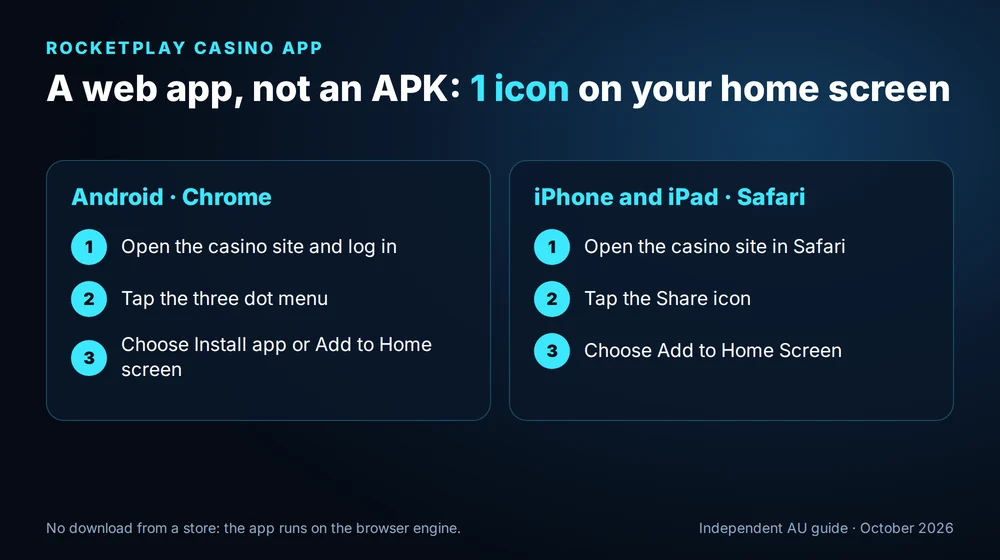
Open the casino site in Chrome and log in, so the app starts inside your account later. Then tap the three dot menu in the top right corner. Depending on your Chrome version, the option reads Install app or Add to Home screen; tap it and confirm the name. A RocketPlay icon appears among your apps within a few seconds, and from then on one tap opens the lobby full screen.
Samsung Internet offers the same option through its own menu. If you ever want to remove the app, hold the icon and choose uninstall, exactly as with any other app, and your account and balance remain untouched on the server.
Install on iPhone and iPad through Safari: 1 icon on the home screen
On iOS the install runs through Safari. Open the casino site, sign in, and tap the Share button, the square with an arrow, at the bottom of the screen on an iPhone or at the top on an iPad. Scroll down the share sheet until you see Add to Home Screen, tap it, keep or edit the name, and press Add. The icon lands on your home screen next to your other apps.
Launched from that icon, RocketPlay opens without the Safari address bar, so pokies and live tables use the whole display. Your login is remembered on the device. Turning on two factor authentication in your profile is a good idea on a phone you carry everywhere.
Install the RocketPlay web app on Android
Add RocketPlay to your iPhone home screen
RocketPlay app vs mobile browser: 6 differences checked
| Point | Web app from the home screen | Mobile browser tab |
|---|---|---|
| Launch | one tap on the icon | open the browser, find the tab |
| Screen | full screen, no address bar | browser bars take space |
| Login | stays signed in on your device | stays signed in until cookies are cleared |
| Updates | always the current version | always the current version |
| Storage | almost none | none |
| Games, cashier, bonuses | identical | identical |
Both routes lead to the same account, the same A$ balance and the same promotions. Most regular players install the icon for convenience and keep the browser as a backup, for example on a work laptop or a borrowed tablet. New to the casino? Creating an account on the phone takes about two minutes, as shown in our RocketPlay registration guide.
What works in the RocketPlay app: 5,000+ games, cashier and chat
Everything that exists on the desktop site is available in the app. The lobby holds the full catalogue of 5,000+ games, with 4,500+ pokies, 300+ live dealer tables and the lottery and crash shelves, sorted by the same filters and the Random button. Shelves such as Bonus Wagering, Megaways and High Volatility work in portrait mode, and live tables switch to landscape when you rotate the phone. A tour of the shelves worth starting from is in our RocketPlay pokies guide.
The cashier handles deposits from A$20 and withdrawals from A$30, the welcome match is selected exactly as on a computer, and verification documents can be photographed and uploaded straight from the phone camera, which is often the quickest way to complete SumSub. Live chat sits one tap away at any hour. The payout side, with MiFinity and crypto paid within 24 hours, is explained in our RocketPlay withdrawal guide.
Claim the welcome bonus in the RocketPlay app
Phone requirements and data: 3 tips for smooth play
| Device | Browser for installing | What to keep updated |
|---|---|---|
| Android phone or tablet | Chrome or Samsung Internet | browser and Android system |
| iPhone | Safari | iOS |
| iPad | Safari | iPadOS |
Three habits keep the app quick. Keep the browser and system updated, since the web app runs on the browser engine underneath. Use Wi-Fi for long live dealer sessions. And close other heavy apps before a long session on an older phone, which leaves more memory for game graphics.
RocketPlay app FAQ: 4 answers
There is no RocketPlay APK in current Australian reviews and no Google Play listing. On Android you install the web app from Chrome: open the casino site, tap the three dot menu and choose Install app or Add to Home screen. The icon behaves like a normal app and needs no security changes or file downloads.
Yes, through Safari rather than the App Store, which has no Australian listing. With the casino site open, the Share button offers Add to Home Screen; after that, RocketPlay launches full screen from its icon with your login remembered. Games, the cashier and chat behave exactly as they do on a computer.
Current Australian reviews list no separate bonus for installing the app. All the regular offers work inside it, though: the welcome package of up to A$2,000 + 100 free spins, Friday spins, the Sunday reload, cashback and Missions, which reward small prizes such as free spins without a deposit.
The web app loads the same encrypted site as the desktop version, protected by 128-bit SSL, and it installs without any file from outside a store. You can add two factor authentication in your profile for extra protection. Install it only from the casino site itself, never from a download link on a third party page.
For over 18s. We are a guide, not the casino. Talk to Gambling Help Online on 1800 858 858 whenever a session stops being fun.
Updated: